The PPH21 Annual Report is a crucial document for reviewing and filing employee income tax details for the fiscal year. Follow the steps below to easily download the report from the system, ensuring accurate and timely tax reporting.
1. Go to Manage Company in the left sidebar of your dashboard.

2. Click on the Payroll Info tab.

3. Scroll down until you find the PPH21 Annual Report section and expand it.

4. Select the tax year accordingly and key in ID TKU and Deduction Date then click the GENERATE XML FILE (CORETAX) button to generate the report.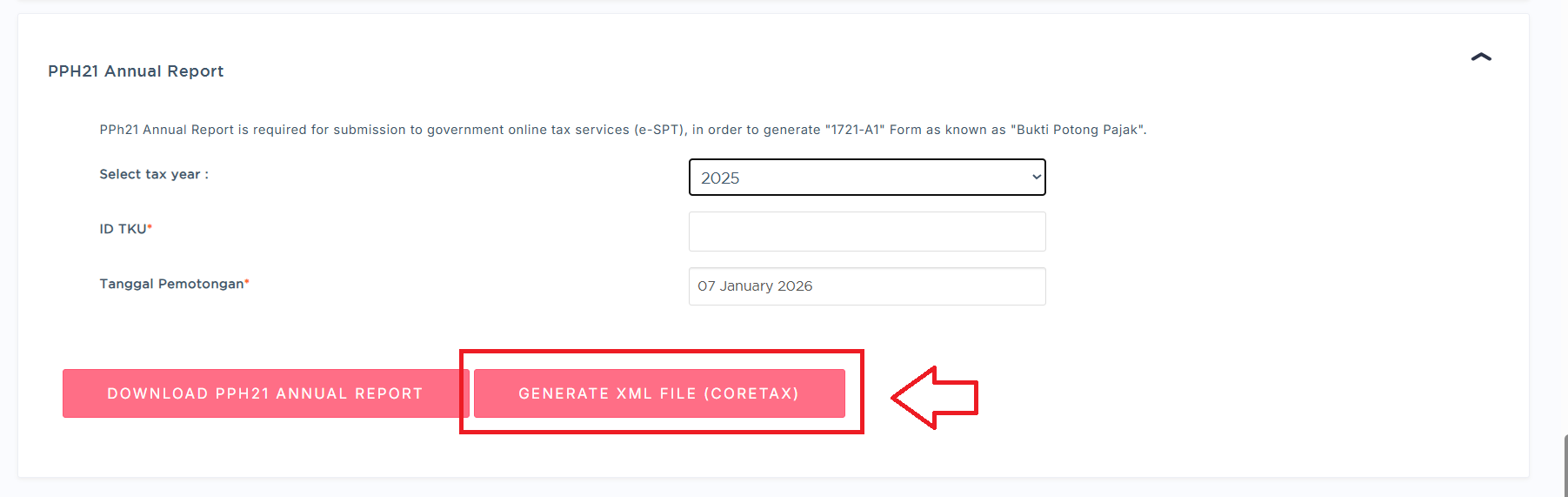
What is an ID TKU?
The Business Activity Location Identification Number (ID TKU) is a number assigned to branch taxpayers and is linked to a single head office Tax Identification Number (NPWP).
The use of a single tax identification number, namely the head office NPWP, allows for simplified administration, including the centralization of reporting SPT and PPN.
Read more at: https://pajak.go.id/en/node/107835
Was this article helpful?
That’s Great!
Thank you for your feedback
Sorry! We couldn't be helpful
Thank you for your feedback
Feedback sent
We appreciate your effort and will try to fix the article